
22.July 2025 | Guest post by ETH Zurich
Provisioning a managed SCION AS on cloudscale
The SCION production network is growing rapidly—with key applications such as the Swiss Secure Finance Network (SSFN) and the Swiss Secure Health Network (SSHN). Together, cloudscale and Cyberlink now enable native SCION connectivity directly from the cloud—independent of internet service providers or consortia. A milestone for secure and resilient network infrastructure in Switzerland.
This is a guest post by ETH Zurich.
The SCION production network has grown strongly in recent years. Notable examples of its use include the Swiss Secure Finance Network (SSFN) and the Swiss Secure Health Network (SSHN), both of which support critical infrastructure and are tailored to the members of their respective ecosystems.
The team at ETH Zurich recently received exciting news about the expansion of SCION into the cloud. In a joint effort, cloudscale and Cyberlink now offer native SCION connectivity to the production network for all customers. This is an important milestone: anyone can now use SCION's advanced network features without needing the support of their ISP or being part of a larger consortium.
In the following, the ETH team walks you through the steps they followed to deploy a SCION Autonomous System (AS) in cloudscale – exactly as any customer could. The ETH staff share their experiences with you from their own personal perspective.
Your very own SCION cloud
The first step is to get in touch with cloudscale and Cyberlink, who provided us with detailed information about their SCION offering. At the time of writing, they support two types of SCION connectivity:
- Unmanaged SCION access: This option provides a direct SCION link to the Cyberlink SCION border router on cloudscale within the requested SCION Isolation Domain (ISD). Customers who choose this approach are responsible for deploying and managing their own SCION AS services in their Virtual Data Center (VDC).
- Managed SCION access: In this setup, Cyberlink takes care of deploying and managing SCION services on the customer's behalf, providing a more convenient experience. Managed access uses the Anapaya EDGE appliance.
In this post we focus on the Managed SCION Access option, more specifically on deploying a SCION-enabled end host within the Managed SCION Access setup. It is particularly well suited to customers who need high-performance connectivity and prefer to outsource the operational effort. With this approach, customers are not responsible for configuring SCION infrastructure services or managing certificates to keep the SCION AS running.
Step-by-step walkthrough
First, we created an account and registered our organization.
We created a project in cloudscale to host our SCION-enabled Virtual Data Center (VDC).
In parallel, Cyberlink got in touch to confirm which cloudscale project should be linked to the SCION access. They also asked whether we had any preferences regarding the subnet to use – in particular the subnet in which we wanted to deploy the SCION end-host nodes. By default, Cyberlink assigns a subnet from the private range. Later, we added this private network to the end-host node virtual machine (see below).
Cloudscale then requested our authorization by email to proceed with linking the SCION access to our project. After we confirmed this, the SCION access appeared in the Networking > Networks section of the cloudscale dashboard.

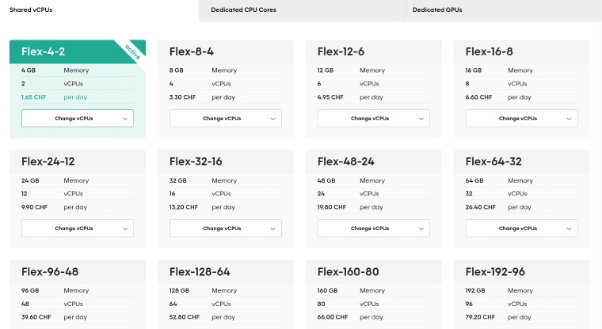
Once the network details were settled, we proceeded with installing and configuring the first SCION end-host node. For this purpose we deployed a virtual machine (VM) in our cloudscale VDC. For our setup we chose the Flex 4-2 instance type running Ubuntu 22.04 LTS – a recommended operating system for SCION deployments (Ubuntu 22.04 LTS or newer is recommended by the SCION implementation guidelines).
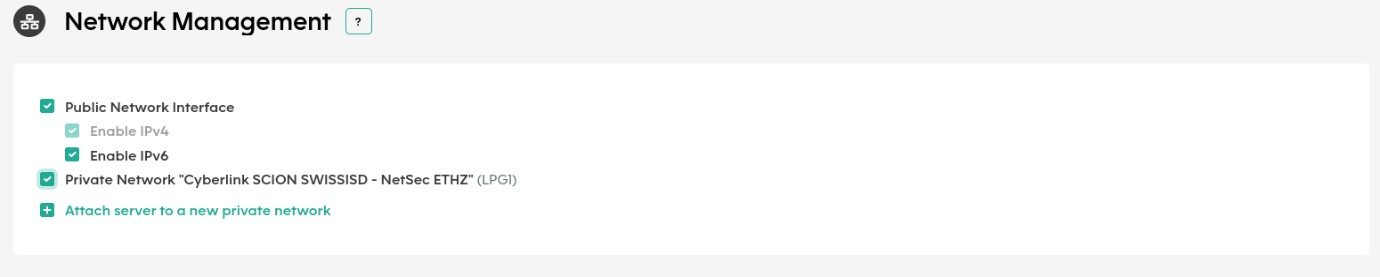
Finally, we added the private SCION network to the network management options. The end host is automatically configured with an address within this range using DHCP.
At this point, Cyberlink provided the connection details for the managed SCION node – in particular the configuration information required on our end host.
At the time of writing, the SCION Edge appliance does not support a bootstrapping service for native SCION applications running locally. This means the SCION end host has to be configured manually. Fortunately, the process is straightforward. We are currently working on a seamless and generalizable integration method for SCION end hosts across all existing SCION ecosystems.
We started by installing the SCION end-host stack. You can refer to the official SCION documentation to install the necessary components, i.e. scion-dispatcher, scion-daemon and scion-tools.
Next, we downloaded the latest version of the bootstrapperless SCION configuration tool. After extracting the archive, we ran the executable from the command line:
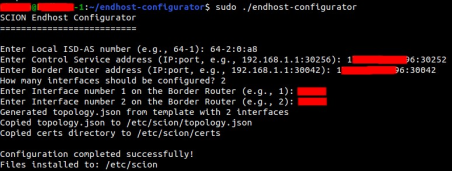
We completed the configuration using the connection details previously provided by Cyberlink.
Finally, we started the SCION daemon and SCION dispatcher services. To verify connectivity, we used the scion showpaths utility, which confirmed that our end host could successfully retrieve paths to the SCION production network.
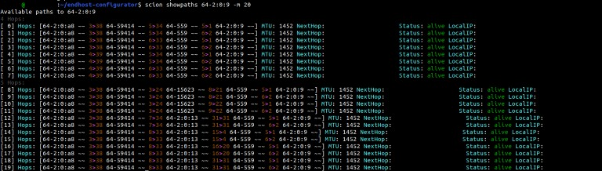
With just a few simple steps, we successfully set up a production-ready SCION environment within minutes. This setup enables secure, high-performance connectivity – established within milliseconds – to any entity in the SCION ecosystem and offers reliability comparable to a leased line.
In this post we focused on deploying a SCION-enabled end host within the Managed SCION setup. But applications that are not SCION-enabled can also benefit considerably from SCION connectivity.
A key advantage of the managed solution with the Anapaya Edge is that even conventional, non-SCION-enabled applications can communicate over SCION-secured connections with other remote applications that are likewise not SCION-enabled.
Technischer Ablauf:
The Edge announces the configured network prefix to other Edges in the SCION network. When traffic is sent to a destination address that is reachable via the SCION network, the Edge encapsulates the IP packet in a SCION packet and transmits it over the best available SCION path to the destination Edge. There, the packet is decapsulated and forwarded transparently to the target system – the application itself remains unchanged and does not need any SCION support.
Advantages over conventional internet communication:
- Protection against routing attacks
- Fast failover in case of network outages
- Dynamic path optimization across all available paths to the destination, which can result in a connection with lower latency, lower loss and lower jitter than over the internet.
- Geofencing through path policy definitions on the Edge.
With this architecture, organizations can benefit from the security and availability advantages of SCION without having to change their applications.
Try it yourself and discover the benefits of a production-ready SCION environment – you can find more information on SCION Cloud here.